TapVideo - Remote Control Video+Still Camera with Flickr, Facebook & Twitter Uploading
Follow @mothertuckerllc





FEATURES:
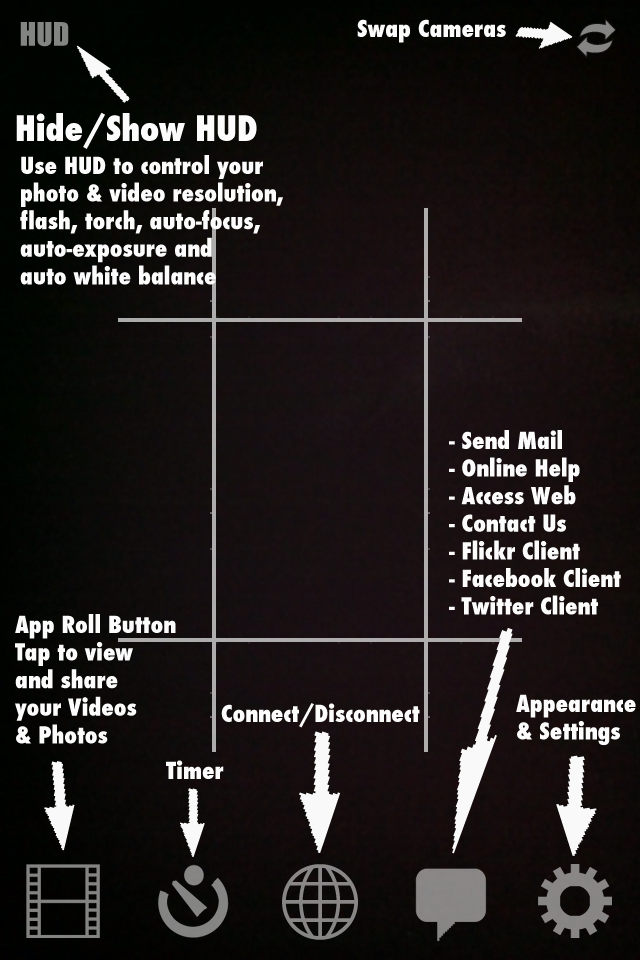
- Single Tap preview to "Take Photo" [Default]
- Double Tap preview to "Start/Stop Recording" [Default]
- Take photos while you're recording
- Press&Hold Preview to Auto Focus (drag to change focus point)
- Resolution / Flash / Torch / Focus / Exposure / White Balance Controls
- 5X Digital Zoom on both cameras
- EXIF - Full Camera EXIF plus Timestamp & GPS info in unedited/uncompressed photos
- Burst Mode - Take 2, 3 or 4 burst shots with a single tap
- Photo Timers - Specify a "Start Time", "Photos Count" and "Delay" using your keyboard
- Video Timers - Specify a "Start Time", "Video Count", "Video Duration" and "Delay" using your keyboard
- Burst Photo Timers - Take as many burst shots as you want by creating a Timer with a "Delay" of 0 seconds
- Zoom, Timers, Recording, Photos supported on both cameras
- Anti-Shake - Use your Accelerometer to take photos only when there is no shaking detected
- Auto Upload - Auto Upload your Videos&Photos to Flickr, Facebook or Twitter in the background
- Auto Save - Keep recording & shooting while photos are saved in the background
- Background Uploading - Kick Off Video&Photo uploads and then switch to your other Apps
- Geotag Flickr Videos&Photos
- Reticles [Scope, Rectangle, Rule Of Thirds] with color choice of [Black, White, Red and Green]
- Button Colors [Black, White, Red and Green]
- Black & White - Auto converts photos to Black&White (Can also be done manually in App camera roll)
- JPEG Quality Control for photos
- Twitter Client - Read / Send Messages and Tweets; Set / Send Twitter GEO location
- Facebook Client - Send Updates with GEO location
- Multiple Selection Support
- Edit and Playback Videos
- Crop and apply Filters (Black & White, Brightness) to Photos
- Upload, Mail, Delete multiple Videos&Photos at once
- Save multiple Videos&Photos to your device's camera roll at once
- Reorder Videos&Photos
- Edit upload locations with a Google map
- Add Existing Videos&Photos from your device's camera roll
- Swipe through full screen view of snapshots
- In-App Mail
CREDITS:
- MGTwitterEngine by Matt Gemmell
- LED font by Allen R. Walden
HOW DO I CONNECT A REMOTE CONTROL WITH A CAMERA?
For feature requests or bug reports, please send an email to
feedback@mothertuckerllc.com. Thank you for using TapVideo PRO!